Experimenting with Local LLMs (Private and Offline AI)
Introduction: Why Run AI Locally?
In this post, I’ll walk you through the fundamentals of running LLMs (Large Language Models) locally on your own hardware; no internet, no external servers, no data leaks.
Running local AI models isn’t as fast or powerful as using services like ChatGPT or Claude, but it has two major advantages:
- Privacy: You can ask sensitive questions or feed private documents into the model without anything leaving your machine.
- Unlimited usage: No token limits or monthly caps. Run it whenever you want, however you want.
The tradeoff? You’ll need to understand how to choose the right model for the task, because your local hardware has limitations, and not all models are equally capable.
Context: What Are LLMs and AI Models?
A Large Language Model (LLM) is an AI model trained on huge datasets of text to generate human-like responses, complete tasks, or write code. These models can vary in size (measured in billions of parameters) and specialize in different tasks.
A few terms to clarify:
- LLM: Large Language Model, such as LLaMA, GPT, Mistral, etc.
- Parameters: The "neurons" of the model. More parameters usually = more capable but slower and heavier.
- AI Agent: A wrapper or framework around the model that gives it memory, tools, or goals (like LangChain agents).
- Ollama: A tool that lets you download, run, and manage LLMs locally via terminal or API.
Setting Up: Ollama
Ollama is a fantastic way to get started with local models. It’s easy to install and manages everything: downloading models, updating them, running them in the terminal, or exposing them via API.
Recommended Models for Normal Hardware
| Model | Size | Best For |
|---|---|---|
llama3.2:3b | 3B | Basic Q&A, summarization |
deepseek-r1:8b | 8B | Reasoning, coding, debugging |
codellama:7b | 7B | Code generation |
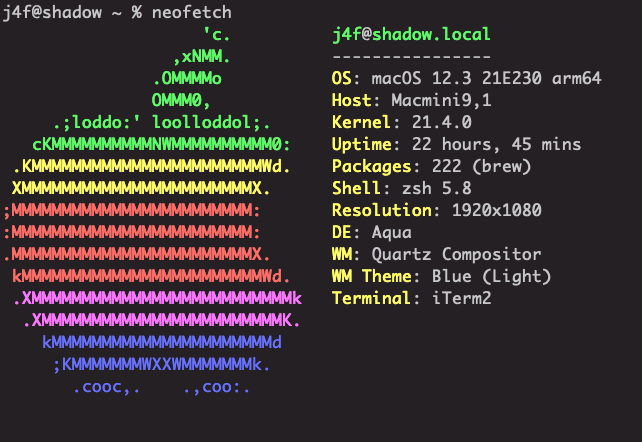
These all run well on a Mac Mini M1 with 8GB RAM. You don’t need a GPU. Ollama handles CPU execution surprisingly well.
In fact this is the device I have used for this demos
Then in your terminal run this commands to fetch your starting models
ollama run llama3.2:3b
ollama run deepseek-r1:8b
ollama run codellama:7b
For quick usage, this are the demo to quickly run and get started. You can run ollama run directly in the terminal. All your prompts and outputs will disappear once the session ends (great for one-time or sensitive tasks).
llama3.2:3b model
deepseek-r1:8b model
Open WebUI: A Friendly Interface
If you want a chat interface like ChatGPT but still running locally, try Open WebUI. It’s built to work seamlessly with Ollama and gives you features like:
- Persistent chat history
- Memory and context retention
- Clean, user-friendly layout
Deploy via Docker
Here’s how to run Open WebUI locally
docker run -d -p 3000:8080 \
  --add-host=host.docker.internal:host-gateway \
  -v open-webui:/app/backend/data \
  --name open-webui \
  --restart always \
  ghcr.io/open-webui/open-webui:main
Once deployed, open your browser at http://localhost:3000 and start chatting with your local models.
Here is quick demo and exploration of of open-webui
Accessing Ollama via API for Agentic Pipelines
One of the most powerful aspects of local LLMs is the ability to go beyond interactive chat, you can treat your model as a backend engine and automate multi-step processes. In this POC, I built a lightweight pipeline agent that uses Ollama’s HTTP API to extract lessons from a story, generate a quiz, and create a runnable Python quiz engine.
GitHub link:
oxj4f/local-llm/blob/main/01-ollama-api/ollama-api.py
What's Happening Under the Hood
The script is a three-stage local pipeline:
- Lesson Extraction:
Using a system prompt tailored to extract core insights from a story file, the LLM returns structured, validated JSON withtitle,summary, andlessons. - Quiz Generation:
A second prompt takes the extracted lessons and creates a 10-question multiple-choice quiz, again in structured JSON format. - Quiz Script Generation:
A final prompt generates a self-contained Python script that asks the user each question in the terminal, accepts answers, and calculates the score.
Each stage logs progress using a custom logger, validates the JSON before saving it, and handles errors cleanly. The result? A clean ./reports/ directory containing:
lessons.jsonquiz.jsonrun_quiz.py(ready-to-run CLI app)
example:
╰─$ python3 ollama-api.py -f data/ctf-1.md
[·] Stage 1: Lesson Extraction started...
[✓] Stage 1: Lesson Extraction complete.
[·] Stage 2: Quiz Generation started...
[✓] Stage 2: Quiz Generation complete.
[·] Stage 3: Quiz Script Generation started...
[✓] Stage 3: Quiz Script Generation complete.
[✓] All results saved to ./reports
[·] Lessons saved to: /Users/j4f/Repo/local-llm/01-ollama-api/reports/lessons.json
[·] Quiz saved to:    /Users/j4f/Repo/local-llm/01-ollama-api/reports/quiz.json
[·] Script saved to:  /Users/j4f/Repo/local-llm/01-ollama-api/reports/run_quiz.py

Run the quiz with:

   /Users/j4f/Repo/local-llm/01-ollama-api/reports/run_quiz.py
Fundamentals of the API Call
The key function is:
def chat(system_prompt: str, user_prompt: str, label: str = "Chat") -> str:This sends a POST request to http://localhost:11434/api/chat, which is the Ollama local endpoint. The payload includes:
- The
model(in this casellama3.2:latest) - A
messageslist with system + user prompt - Output format set to
"json" - Streaming disabled for single response
{
  "model": "llama3.2:latest",
  "messages": [
    {"role": "system", "content": "..."},
    {"role": "user", "content": "..."}
  ],
  "stream": false,
  "format": "json"
}
Tips for Agentic Local LLMs
Here are a few design considerations that are critical when building deterministic, reliable pipelines:
- Determinism requires low temperature
When calling Ollama for tasks like code or JSON generation, you must keeptemperaturearound0.3or lower. This ensures:- Less randomness in output
- Consistent JSON structures across runs
- Better reproducibility (important for dev workflows)
- Always validate JSON output
LLMs can sometimes hallucinate or wrap responses in prose. Validate the response usingjson.loads()before treating it as truth. - Use role separation (
systemvsuser) clearly
Ollama uses the OpenAI-style message format. System messages set the tone, while user messages provide the input. This separation improves model alignment with the intended task. - Structure your prompts like APIs
Think of eachsystem_promptas a function signature — include structure, constraints, and expected return types (like JSON, Python code, or Markdown-free answers).
The Agentic Pattern
The script uses the LLM in three distinct roles:
| Stage | LLM Role | Behavior |
|---|---|---|
| Stage 1 | Teaching Assistant | Extracts lessons |
| Stage 2 | Instructional Designer | Builds the quiz |
| Stage 3 | Python Developer | Writes the CLI app |
This division of labor maps directly to the agentic mindset: define the role, give it a goal, and validate the result before continuing. It’s simple, but it mirrors how larger multi-agent systems (like Auto-GPT or LangChain agents) operate under the hood.
Final Thoughts: Why This Matters
Running LLMs locally isn’t just a geeky side project, it’s a philosophical stance on AI ownership, privacy, and capability.
We’ve walked through:
- What LLMs are, and how to run them privately on your own machine.
- How to use Ollama to manage and run models like
llama3.2,deepseek-r1, andcodellama. - How to add a friendly GUI layer with Open WebUI for persistent, offline conversations.
- And finally, how to build your own AI pipeline using Ollama’s API. Transforming plain text into lessons, into a quiz, into a CLI script, with deterministic outputs and validated logic.
At the heart of all this is a shift in mindset:
You're not just a user of AI — you're an architect of your own agentic systems.
When you stop relying on cloud APIs for every interaction, you gain:
- Control: Your data stays with you.
- Freedom: No limits, no rate caps, no API keys.
- Creativity: Build workflows and tools the big players haven't thought of.
And yes, while it's slower than the cloud and takes a bit more tinkering, it’s yours.
So whether you're building your own agent pipelines, analyzing private data, or just experimenting, this is the beginning of something powerful. You just need a mindset shift, a local model, and a terminal.